MultiHexTutorial: Difference between revisions
Remove Obsolete tag and a bad link. |
lede |
||
| (2 intermediate revisions by 2 users not shown) | |||
| Line 1: | Line 1: | ||
This is a tutorial having to do with the [[TerrainGraphicsWML|Terrain Graphics]] system. | |||
(quickly written, I'll explain it more in detail when I have more time -- Ayin) | (quickly written, I'll explain it more in detail when I have more time -- Ayin) | ||
| Line 5: | Line 7: | ||
Suppose we have the following map to fill with mountain tiles: | Suppose we have the following map to fill with mountain tiles: | ||
http:// | http://wesnoth.org/wiki-images/multi-hex/tutorial1.png | ||
And we have the following images to fill it: | And we have the following images to fill it: | ||
* tile1: http:// | * tile1: http://wesnoth.org/wiki-images/multi-hex/tile1.png | ||
* tile2: http:// | * tile2: http://wesnoth.org/wiki-images/multi-hex/tile2.png | ||
* tile5: http:// | * tile5: http://wesnoth.org/wiki-images/multi-hex/tile5.png | ||
We will use the following three rules to fill the mountains. Beware: '''Spaces into maps do matter!''' | We will use the following three rules to fill the mountains. Beware: '''Spaces into maps do matter!''' | ||
<syntaxhighlight lang=wml> | |||
[terrain_graphics] | |||
map=" | |||
. , 1 | |||
, . | |||
. , 1 | |||
, . | |||
. , 1 | |||
, 1 | |||
1" | |||
[tile] | |||
pos=1 | |||
type=Mm | |||
[/tile] | |||
probability=30 | |||
no_flag="base" | |||
set_flag="base" | |||
[image] | |||
layer=-1000 | |||
name=tile5 | |||
[/image] | |||
[/terrain_graphics] | |||
[terrain_graphics] | |||
map=" | |||
. | |||
, 1 | |||
1" | |||
[tile] | |||
pos=1 | |||
type=Mm | |||
[/tile] | |||
probability=30 | |||
no_flag="base" | |||
set_flag="base" | |||
[image] | |||
layer=-1000 | |||
name=tile2 | |||
[/image] | |||
[/terrain_graphics] | |||
[terrain_graphics] | |||
[tile] | |||
x=0 | |||
y=0 | |||
type=Mm | |||
[/tile] | |||
probability=100 | |||
no_flag="base" | |||
set_flag="base" | |||
[image] | |||
layer=-1000 | |||
name=tile1 | |||
[/image] | |||
[/terrain_graphics] | |||
</syntaxhighlight> | |||
The first rule, regarding the biggest mountains, will apply first. It will include, with 30% probability, the big | The first rule, regarding the biggest mountains, will apply first. It will include, with 30% probability, the big | ||
5-tile mountain range. This will make, for example, something like this. | 5-tile mountain range. This will make, for example, something like this. | ||
http:// | http://wesnoth.org/wiki-images/multi-hex/tutorial2.png | ||
The second rule will then apply. Note that the previous rule had set the "built-m" flag, thus preventing the mountains | The second rule will then apply. Note that the previous rule had set the "built-m" flag, thus preventing the mountains | ||
| Line 82: | Line 83: | ||
something like that: | something like that: | ||
http:// | http://wesnoth.org/wiki-images/multi-hex/tutorial3.png | ||
The, the last rule, with 100% probability (the probability key could have been omitted) will apply. It will place a | The, the last rule, with 100% probability (the probability key could have been omitted) will apply. It will place a | ||
mountain tile on the places where no other mountain tile was placed. The final mountain range will look like that: | mountain tile on the places where no other mountain tile was placed. The final mountain range will look like that: | ||
http:// | http://wesnoth.org/wiki-images/multi-hex/tutorial4.png | ||
== Village with a tower == | == Village with a tower == | ||
Latest revision as of 03:41, 8 May 2023
This is a tutorial having to do with the Terrain Graphics system.
(quickly written, I'll explain it more in detail when I have more time -- Ayin)
First example: mountains
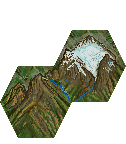
Suppose we have the following map to fill with mountain tiles:
http://wesnoth.org/wiki-images/multi-hex/tutorial1.png

And we have the following images to fill it:
- tile1: http://wesnoth.org/wiki-images/multi-hex/tile1.png
- tile2: http://wesnoth.org/wiki-images/multi-hex/tile2.png
- tile5: http://wesnoth.org/wiki-images/multi-hex/tile5.png


We will use the following three rules to fill the mountains. Beware: Spaces into maps do matter!
[terrain_graphics]
        map="
.  ,  1
,  .
.  ,  1
,  .
.  ,  1
,  1
1"
        [tile]
                pos=1
                type=Mm
        [/tile]
        probability=30
        no_flag="base"
        set_flag="base"
        [image]
                layer=-1000
                name=tile5
        [/image]
[/terrain_graphics]

[terrain_graphics]
        map="
.
,  1
1"
        [tile]
                pos=1
                type=Mm
        [/tile]
        probability=30
        no_flag="base"
        set_flag="base"
        [image]
                layer=-1000
                name=tile2
        [/image]
[/terrain_graphics]

[terrain_graphics]
        [tile]
                x=0
                y=0
                type=Mm
        [/tile]
        probability=100
        no_flag="base"
        set_flag="base"
        [image]
                layer=-1000
                name=tile1
        [/image]
[/terrain_graphics]
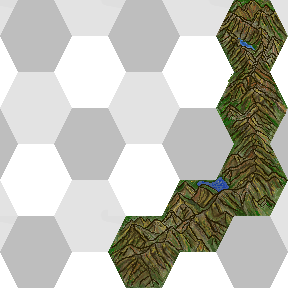
The first rule, regarding the biggest mountains, will apply first. It will include, with 30% probability, the big 5-tile mountain range. This will make, for example, something like this.
http://wesnoth.org/wiki-images/multi-hex/tutorial2.png
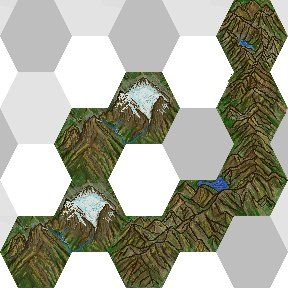
The second rule will then apply. Note that the previous rule had set the "built-m" flag, thus preventing the mountains from the second rule to overlap the place where the first mountains already have been placed. The result will be something like that:
http://wesnoth.org/wiki-images/multi-hex/tutorial3.png
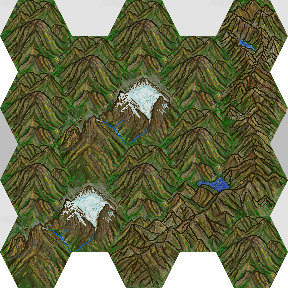
The, the last rule, with 100% probability (the probability key could have been omitted) will apply. It will place a mountain tile on the places where no other mountain tile was placed. The final mountain range will look like that:
http://wesnoth.org/wiki-images/multi-hex/tutorial4.png
Village with a tower
To add a building with a tower that spans over 2 hexes, you may use the following rule (Tt being the character representing the building hex)
[terrain_graphics]
     map="*, 1"
     [tile]
         pos=1
         type=Tt
     [/tile]
     [image]
         name=tower # a 36x72 image
         position=vertical
         base=36,108
     [/image]
[/terrain_graphics]
Reference
Map:
'.' means "this rule does not apply to this hex" (i.e: no image will be set to this hex, this hex will not be checked for flags, etc).
'*' means "this rule applies to this hex, but this hex can be any terrain type".
Flags:
no_flag="built-m" means that the rule only matches if the flag "built-m" is not set.
set_flag="built-m" means that the rule, upon matching, sets the flag "built-m".